Fi7Note use case

Review and correct your workout before saving

Free-text workout logging should not mean blind saving. A good workout notes app should show what it understood before the workout becomes history. Fi7Note does this with a review step before saving, where you can check recognized highlights, muscles, and workout details.

Free-text logging is fast. Review keeps it trustworthy.

Fi7Note lets you write naturally, see recognized highlights, adjust what matters, and save only after one clear review step.

What if your workout tracker misunderstands your note?

If Fi7Note ever reads part of your workout differently than you meant it, you can check and adjust the recognized details before saving.

That matters because real workout notes are rarely perfect. People write quickly between sets, mix shorthand with full exercise names, add weights in different units, and include small notes around the actual workout data.

Free-text logging should stay fast, but the saved workout should still be under your control. Fi7Note is built around that balance: write the note naturally, see what was recognized, review the details, then save a workout record you can use later.
Free-text logging should not mean blind saving

Typing a workout naturally is useful because it removes friction during training. You do not have to open a form, choose every exercise first, or build a template before you can log what happened.

But fast input alone is not enough. If an app turns your note into history without showing what it understood, you have to trust the result blindly.

Fi7Note avoids that. It keeps the flow fast while still giving you a review step before saving. You can see the recognized workout information close to the original note, so the structure remains understandable instead of feeling hidden or automatic.

Review recognized highlights before saving

Fi7Note highlights recognized workout data directly in the note while you log. Before saving, the review step keeps those recognized highlights visible in the workout text, so you can check how the note was interpreted.

This is useful for exercises, numbers, units, time, distance, pace, speed, cardio-related values, and notes around the workout. Instead of separating the result from the original text, Fi7Note keeps the note understandable.

The point is not to slow logging down. The point is to give you one clear checkpoint before a fast note becomes a saved workout record.

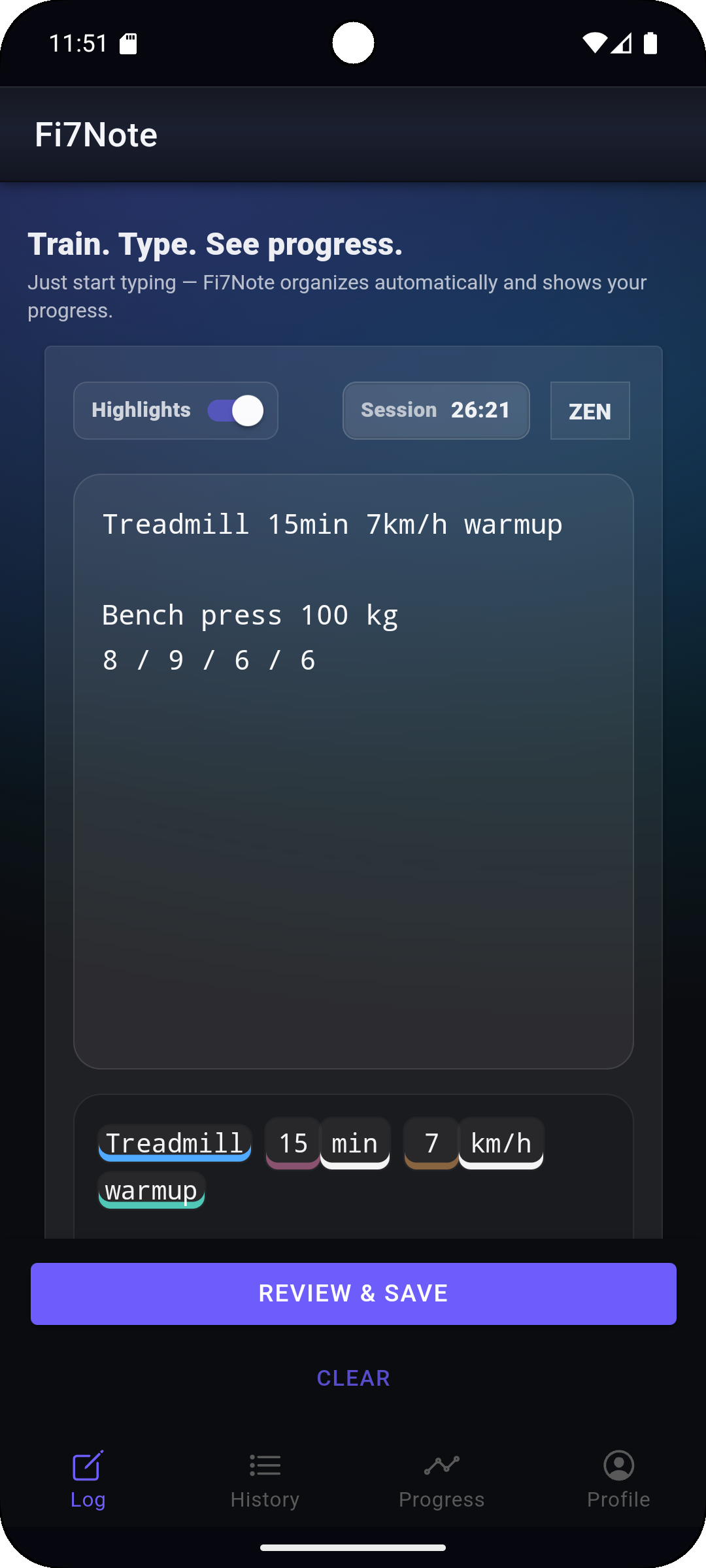
Fi7Note workout note with recognized highlights for exercises, values, units, and notes.

Recognized highlights stay readable in the workout note

Exercises, values, units, and notes stay visible inside the original text, so you can understand what Fi7Note recognized before saving.

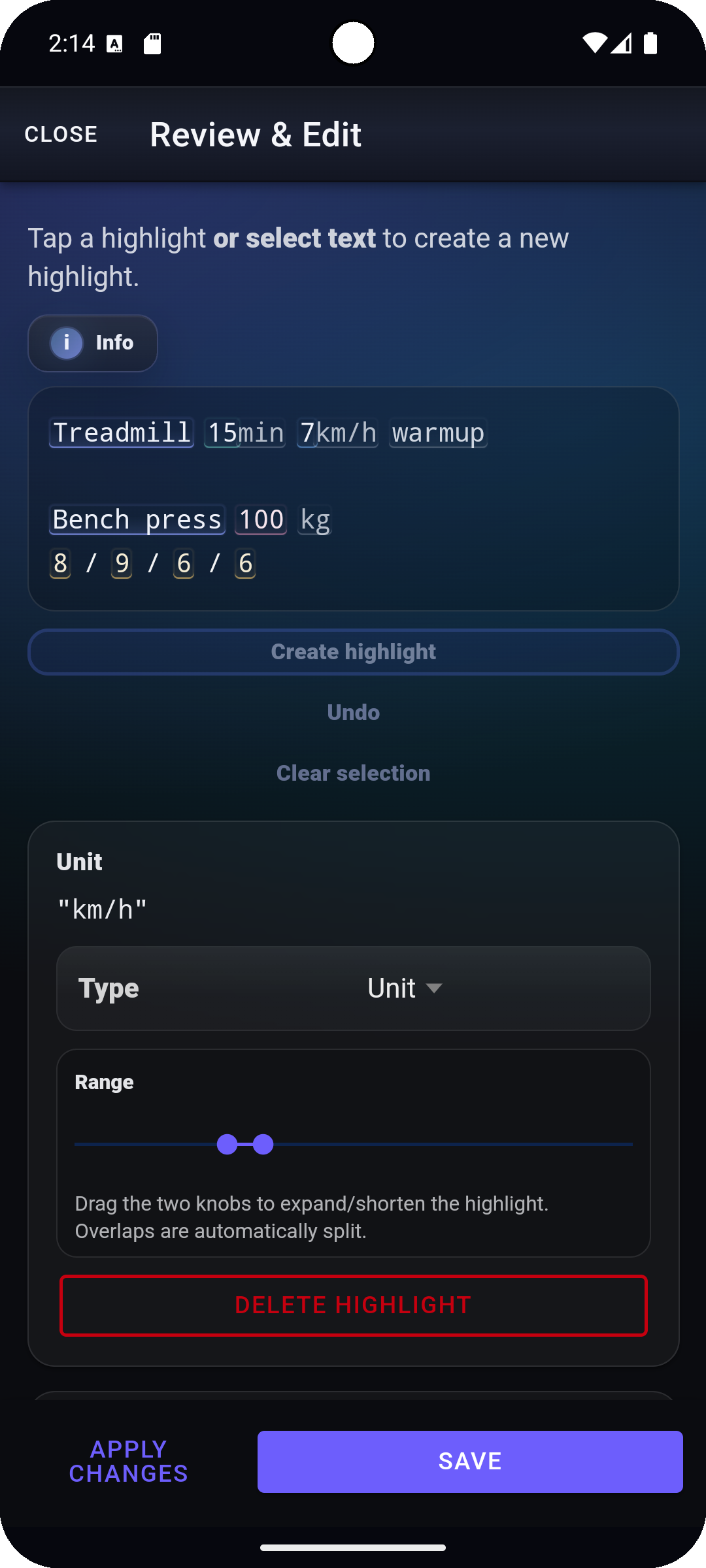
Fi7Note review step showing editable workout highlights and recognized muscles before saving.

The review step keeps corrections close to the note

Before saving, you can check editable highlights, adjust recognized muscles, and correct workout details without re-entering the whole session.

Adjust highlights, muscles, and workout details

During review, recognized highlights can be adjusted directly in the workout text. You can add missing highlights, remove highlights that do not belong, or adjust the selected text range when recognition is close but not exactly what you meant.

Fi7Note also lets you review recognized muscles before saving. That matters because muscle-related data can later support muscle views, muscle distribution, and muscle focus insights. If the recognized muscle information needs adjustment, you can fix it before the workout becomes part of your history.

The review step should feel like a quick correction pass, not like filling out a form after the workout. Fi7Note is still built for fast workout notes first, with review as the control layer before saving.

Keep your workout history useful later

Review matters because saved data becomes your workout history.

A quick check before saving helps keep later views like previous weights, PRs, trends, exercise details, and muscle views useful. You are not reviewing because every note needs fixing. You are reviewing because the record should stay yours before it becomes part of your long-term training history.

That is the Fi7Note flow:

  • Write fast.
  • Review before saving.
  • Use the data later.
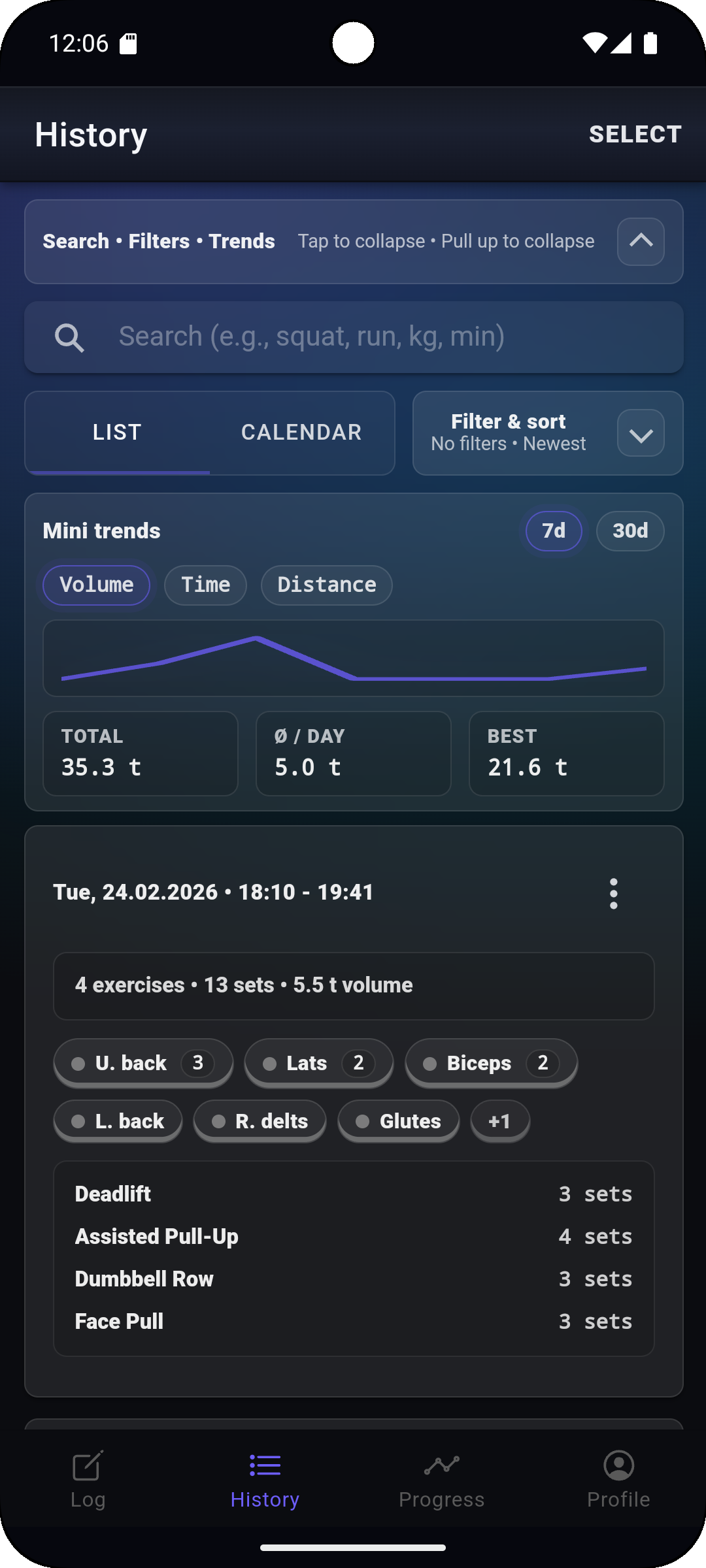
Fi7Note History screen showing saved workout data used later for previous weights, PRs, trends, and muscle views.

A quick review protects the usefulness of later history

Once the record is saved, History and Progress stay more useful for previous weights, PRs, trends, and muscle-related views.

Fi7Note use case

Fast notes. Controlled saving. Useful history.

Fi7Note is built for people who want to log workouts quickly without losing control of the saved data. Write your workout like a note, review what was recognized, adjust what matters, and keep a workout history you can use later.

FAQ

Common questions about reviewing free-text workout notes before saving them in Fi7Note.

What if Fi7Note misunderstands my workout note?

If Fi7Note ever reads part of your workout differently than you meant it, you can review the recognized details before saving. The review step lets you check what was highlighted, adjust recognized workout data, and correct details before the workout becomes part of your history. This keeps free-text logging fast without forcing you to accept every recognized detail blindly.

Can I review workout data before saving it?

Yes. Fi7Note gives you a review step before saving, so you can check the recognized workout information while it is still connected to the original note. This helps you keep control over the saved record without turning workout logging into a slow form-based process.

What workout data can Fi7Note recognize and review?

Fi7Note can recognize and let you review workout details such as exercises, sets, reps, weights, units, time, distance, pace, speed, cardio-related values, notes, recognized muscles, and workout session timing. Depending on the note, Fi7Note can also help with exercise suggestions, unit conversion, and derived cardio values such as pace or speed from time and distance. The exact review depends on what was written in the workout note.

Can I adjust highlights and recognized muscles?

Yes. In the review step, you can adjust recognized highlights directly in the workout text. You can add missing highlights, remove highlights that do not belong, or change the selected range when needed. Recognized muscles can also be reviewed and adjusted before saving.

Why does review matter for workout history?

Saved workout data becomes the history you use later for previous weights, PRs, trends, exercise details, and muscle views. A quick review before saving helps keep that history useful. It is not there because every recognition result needs fixing; it is there so fast notes can become reliable workout records.

Does review make free-text workout logging slower?

The goal is still fast logging. Fi7Note lets you type naturally first, then review before saving only where needed. For many workouts, review is a quick confirmation step; when something needs adjustment, you can fix it before it affects your history.